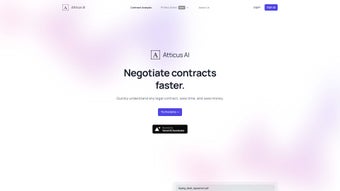

Download Atticus – AI‑Powered Contract Analysis Tool for Fast, Secure Review
Atticus AI is a cutting‑edge, subscription‑based web application that brings the power of artificial intelligence to the often‑tedious task of legal contract analysis. Designed for lawyers, contract managers, in‑house counsel, startups, and anyone who regularly negotiates agreements, Atticus instantly highlights key provisions, flags potential risks, and even suggests language to strengthen your position. While it does not replace professional legal counsel, the platform dramatically reduces the time and cost associated with manual review, allowing users to focus on strategy rather than line‑by‑line reading.
A free starter pack lets you analyze one contract at no charge, and flexible pricing plans let you scale the service as your workload grows. The interface is clean, the feedback is immediate, and the tool integrates seamlessly with common document formats, making Atticus a compelling addition to any legal‑tech stack. In addition to speed, the solution places a strong emphasis on security: every file is encrypted in transit and at rest, and the service complies with industry‑standard data‑protection regulations.
Whether you are a solo practitioner reviewing a handful of agreements each week or part of a large enterprise handling hundreds of contracts, Atticus AI offers a scalable, secure, and user‑friendly environment that helps you stay ahead of risk and negotiate from an informed position.
Key Features and Benefits of Atticus AI
- Instant Provision Extraction: The AI scans the entire document and pulls out critical clauses such as termination, indemnification, confidentiality, and payment terms within seconds.
- Risk Scoring & Highlighting: Each identified clause receives a risk score, and high‑risk language is highlighted in real time, helping you spot negotiation points at a glance.
- Suggested Revisions: Atticus provides example language and negotiation tips for problematic sections, giving you a solid starting point for discussions with counterparties.
- Multi‑Format Support: Upload contracts in PDF, DOCX, or plain text, and the system normalizes the content for accurate analysis.
- Secure Cloud Processing: All documents are encrypted in transit (TLS 1.2) and at rest (AES‑256), complying with industry‑standard security protocols.
- Version Comparison: Upload multiple versions of the same agreement to see what changed, with side‑by‑side visual diff tools.
- Collaborative Review: Share analysis results with teammates via a secure link, add comments, and track who has approved each clause.
- Flexible Pricing Tiers: From a free single‑contract starter pack to unlimited enterprise plans, you can choose the level that fits your budget.
- Demo Mode: A sandbox environment lets prospective users test the platform on sample contracts without committing to a subscription.
- Continuous Learning: The AI model improves over time by incorporating user feedback, ensuring that future analyses become even more precise.
The combination of these features translates into tangible business benefits. Users typically report a 60‑70 % reduction in the time spent on first‑pass contract review, which directly lowers legal expenses and accelerates deal cycles. The risk‑scoring engine acts as an early‑warning system, allowing teams to address high‑risk clauses before they become negotiation roadblocks.
Moreover, the collaborative workspace eliminates the need for back‑and‑forth email threads, consolidating feedback in a single, auditable location. For organizations that must adhere to strict compliance standards, the encrypted cloud environment provides peace of mind that confidential contract data will not be exposed or mishandled. Finally, the continuous‑learning aspect means that the tool becomes smarter with each use, delivering increasingly accurate insights as your organization feeds it more data.
Installation, Compatibility, and Step‑by‑Step Usage Guide
Because Atticus AI is a cloud‑based SaaS solution, there is no traditional “installation” required on your desktop or mobile device. The platform is accessible through any modern web browser (Chrome, Edge, Firefox, Safari) on Windows, macOS, Linux, iOS, and Android. This eliminates the need for IT‑department approvals, licensing headaches, or hardware upgrades. Below is a detailed walkthrough that helps new users get up and running quickly, followed by a brief overview of system compatibility and recommended browsers.
- Create an Account: Visit the official Atticus website, click “Sign Up,” and fill in your name, professional email address, and a strong password. A verification email will be sent; click the link to activate your account.
- Select a Plan: Choose the free starter pack to analyze a single contract or opt for a paid tier that matches your anticipated volume. All plans support both monthly and annual billing cycles, with a discount for annual commitments.
- Upload Your Contract: From the dashboard, click “New Analysis.” Drag‑and‑drop your PDF, DOCX, or TXT file, or use the file picker. The system automatically parses the document, normalizes the text, and begins analysis.
- Review the AI Report: Within seconds, a summary view appears, highlighting clauses, displaying risk scores, and offering suggested revisions. Clicking on any highlighted clause expands a detailed explanation and alternative language.
- Collaborate (Optional): Invite colleagues by entering their email addresses. They receive a secure link that grants view or comment permissions without requiring a separate account.
- Export or Save: Download the full report as a PDF for record‑keeping, or export the suggested language as a JSON file for integration with your document‑management system.
- Track Changes Over Time: For contracts that undergo multiple revisions, upload each new version to the same project. Atticus will generate a side‑by‑side diff, highlighting additions, deletions, and modifications.
Compatibility: Because Atticus runs entirely in the browser, it works on all major operating systems—Windows 10/11, macOS Catalina and later, popular Linux distributions, iOS 13+, and Android 8+. The responsive design adapts to tablets and smartphones, enabling contract review while traveling or during meetings.
For the best experience, we recommend using the latest version of Chrome, Edge, or Safari, and ensuring that your browser allows pop‑ups and cookies from atticus.ai. The platform also supports dark mode for users who prefer a low‑light interface. If you encounter any issues, the built‑in help center provides video tutorials, a searchable knowledge base, and live chat support during business hours.
Final Verdict, Pros & Cons, Frequently Asked Questions, and Call to Action
Pros and Cons Summary
- Fast, AI‑driven extraction of key clauses reduces review time by up to 70 %.
- Risk scoring and visual highlights make problem areas instantly recognizable.
- Suggested revision language provides a practical starting point for negotiations.
- Secure, encrypted cloud storage protects confidential contract data.
- No software download required; works on any modern browser across devices.
- Flexible pricing lets small teams start for free and scale as needed.
- Collaboration tools streamline internal review cycles.
- Continuous learning model improves accuracy over time.
- Outputs are not a substitute for qualified legal advice; professional review may still be necessary.
- Complex, highly customized contracts may occasionally produce false‑positive risk flags.
- Dependence on internet connectivity; offline analysis is not currently supported.
- Advanced features (e.g., bulk uploads, API access) are reserved for higher‑tier enterprise plans.
- Pricing can become costly for organizations that need to analyze dozens of contracts monthly.
Frequently Asked Questions
Can Atticus AI replace a lawyer for contract review?
No. Atticus provides AI‑generated insights and risk scores, but it does not constitute legal advice. Users should still consult a qualified attorney for final approval, especially for high‑value or complex agreements.
Is my data safe when I upload contracts to Atticus?
Yes. All files are encrypted in transit (TLS 1.2) and at rest (AES‑256). Atticus adheres to industry‑standard security practices and does not share your documents with third parties without explicit permission.
What file formats does Atticus support?
You can upload contracts in PDF, Microsoft Word (DOCX), and plain text (TXT) formats. The platform automatically converts the file into a searchable format for analysis.
How does the free starter pack work?
The free starter pack allows you to analyze a single contract with full feature access. After the analysis, you can either purchase additional credits or upgrade to a subscription plan for ongoing use.
Can I integrate Atticus with my existing contract management system?
At the moment, Atticus offers API endpoints for enterprise customers, enabling integration with popular contract lifecycle management (CLM) platforms. Contact sales for details on API access and pricing.
Conclusion and Call to Action
Atticus AI stands out as a highly efficient, secure, and easy‑to‑use tool for anyone who needs to dissect legal agreements quickly. Its AI‑driven risk scoring, instant clause extraction, and practical revision suggestions give users a significant advantage in negotiations without the overhead of traditional legal consulting. While it is not a substitute for professional counsel, the time saved on preliminary reviews can be redirected toward strategic decision‑making and deeper legal analysis.
If you are looking to streamline your contract workflow, reduce the cost of repetitive reviews, and empower your team with actionable insights, download Atticus today. Start with the free starter pack, explore the demo, and decide whether the paid tiers match your volume needs. The combination of speed, security, and intelligent guidance makes Atticus a worthy addition to any modern legal‑tech arsenal.



.png)



